
Redact PDF online for Free
Black out names, account numbers and other sensitive data in your PDF for free, with nothing to install. AI finds personal data automatically, every redaction is permanent, and you get 100 pages free every month.
Free: 100 pages every month · unlimited documents
Drop your PDF here to open it
or click to choose a file. It opens in your browser and isn't uploaded.
🔒 Your PDF is opened, OCR'd and redacted right in your browser
Redact in 3 Simple Steps
Redact a PDF free in your browser, with nothing to install.
Open Your PDF
Drag & drop your document or choose it from your device. We support all standard PDFs.
Automatic AI Scan
Our AI detects sensitive PII instantly.
Review & Save
Review redactions, apply manual edits, and save a secure PDF.
See It in Action
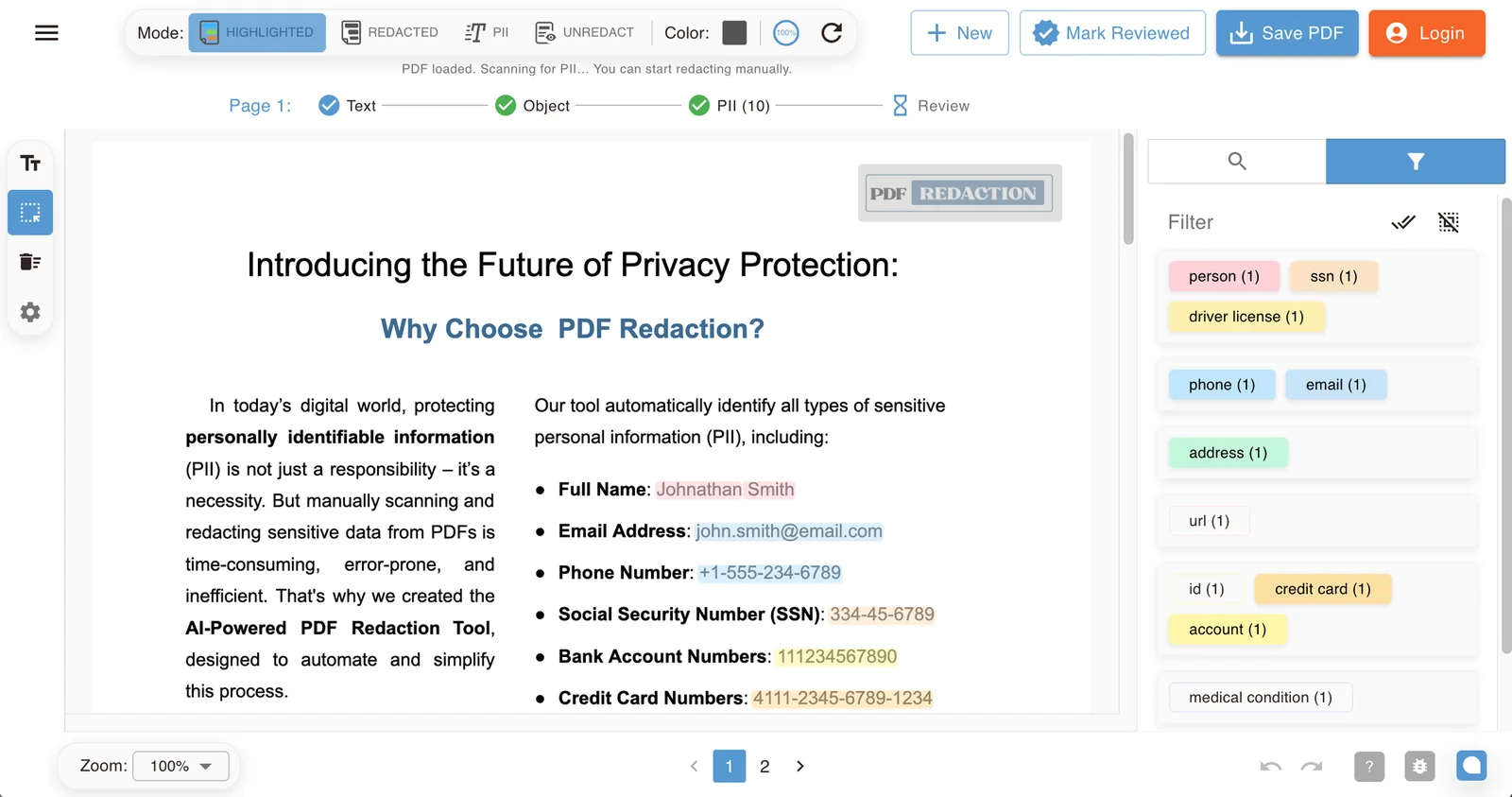
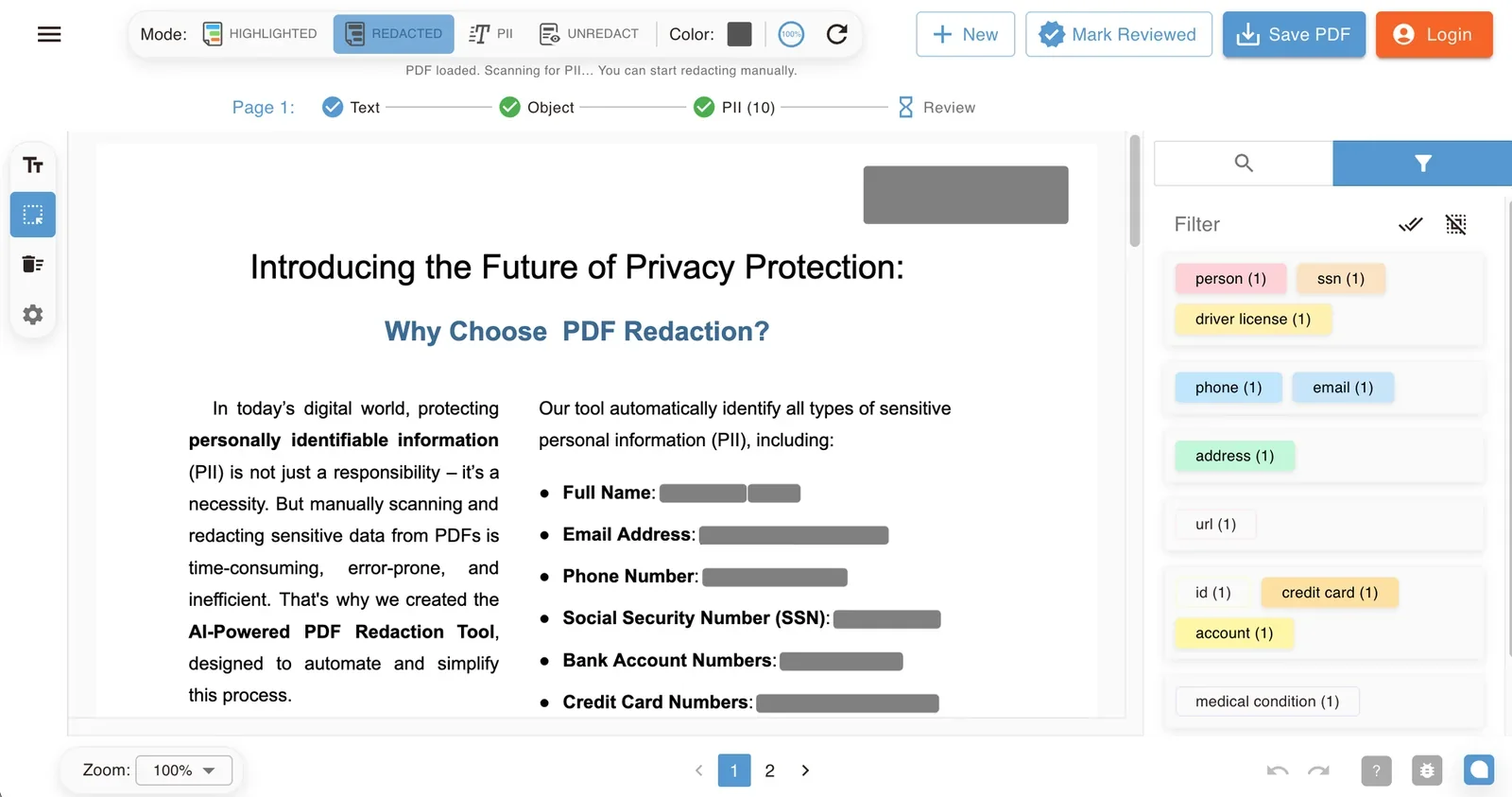
The AI highlights names, contact details, ID and account numbers, and faces, color-coded by type. Switch to the Redacted view to see exactly what your saved PDF will look like.
Total Control: AI Precision Meets Human Control
While our AI does the heavy lifting, you retain full control over every redaction decision.
Smart PII Filters
Toggle redaction for Names, Addresses, Phones, or Locations individually with complete precision.
Search & Redact
Type a word, name or number, pick it from the suggestions, and every occurrence across all pages is redacted at once.
Manual Draw Mode
Missed something? Draw a box over any area to black it out instantly with zero effort.
Visual Customization
Choose between black bars or whiteout redaction styles to match your workflow and document aesthetics.
Free PDF Redaction Tool: Features & Limits
Redact names, numbers and other sensitive data from PDF files with our free PDF redaction tool. Ideal for personal use or quick document security checks.
Core Redaction Capabilities
Start redacting sensitive PDFs immediately. Perfect for personal use and professionals.
Free Plan Limits
100 pages per month, up to 25 pages per document. Files up to 5 MB without an account, or 25 MB once you sign in.
Need More?
Upgrade for a larger monthly page allowance, batch processing and custom redaction rules.
Prefer not to pay?
Earn free credits by helping us spread the word — no credit card required.
Redact PDF Online Free: Everything You Need
Redacting a PDF means permanently removing sensitive information — not just covering it up. Our free online redact PDF tool lets you black out names, social security numbers, account numbers, and other personal or confidential data directly in your browser, so nothing is recoverable once the file is saved.
Unlike drawing a black box in a PDF editor, which only hides text visually while leaving it selectable and searchable underneath, our redaction engine deletes the underlying text and image data entirely. That makes it a safer way to redact PDF documents before sharing them with clients, regulators, or the public.
You don't need Adobe Acrobat, a desktop install, or any technical setup to redact a PDF online. Our AI automatically detects PII, PHI, and financial data, while manual redaction tools give you full control to black out any word, sentence, or region of a page — ideal for legal documents, medical records, financial statements, and government filings.
Whether you need a quick PDF redaction tool for a single file or want to process thousands of documents through our REST API and n8n integrations, PDF Redaction scales from individual users to enterprise workflows, including fully on-premise deployment.
Redact PDF FAQs
- What is PDF redaction and how does it work?
- PDF redaction is the process of permanently removing sensitive information from a document so it cannot be viewed or recovered. Our tool supports automatic detection of things like personal identifiers and manual redaction for full user control.
- Can I undo a redaction in the saved file?
- No. Once you save the file, redactions become permanent and irreversible. However, before saving, you can undo both automatic and manual redactions freely.
- Is this tool free to use?
- Yes — the tool is completely free for everyday use. The free version processes up to 100 pages per month, with unlimited number of documents.
- Will the redacted content still exist in the file's metadata?
- No. The tool regenerates the PDF from scratch and fully removes metadata, ensuring sensitive information is not preserved anywhere in the file.
- Is my document secure during redaction?
- Your PDF is opened, OCR'd and redacted in your browser, and the redacted file is generated on your device. To find personal data, the AI scan sends the text of each page to our PII-detection API by default. Switch PII detection to Local mode in Settings to keep detection entirely on your device.
- Do I need Adobe Acrobat or any other software to redact a PDF?
- No. Our redact PDF tool runs in your browser, so there's nothing to install and no Adobe Acrobat license required. Open your file, redact sensitive text or images, and download the result.
- Can I redact a PDF so the text cannot be uncovered?
- Yes. Drawing a black box over text in a PDF editor only hides it visually: the original text can still be selected, copied or extracted. True redaction permanently deletes the underlying text and image data, which is what our tool does by default.
- How do I black out text in a PDF?
- Open your PDF, let the AI mark sensitive data automatically, or switch to manual mode and drag a box over any text or image. Choose black bars or whiteout, review the result, and save. The covered content is deleted from the file, not just hidden.
- Can I search for a word and redact every occurrence?
- Yes. Open the search panel in the right sidebar, start typing a word, name, number or phrase, and pick a match from the suggestions. Every occurrence across all pages is redacted in one click.
- Can I redact a PDF on any device, including Mac, Windows, and mobile?
- Yes. Since redaction happens in your browser, you can redact a PDF on Mac, Windows, Linux, or mobile without installing anything. A native Desktop app for Windows, macOS and Linux is also available for users who prefer an offline workflow.
- Can I redact a scanned PDF?
- Yes. Scanned and image-based PDFs are run through OCR in your browser, so the AI can find personal data in them too. You can also draw redaction boxes manually over any area of the page.
Prefer a desktop app? Get PDF Redaction Studio for Windows 11 and 10 from the Microsoft Store, or read how to redact a PDF on Windows.
For Business & Enterprise
Scale Your Privacy Infrastructure
The free tool is just the beginning. Enhance your organization's workflow with our advanced processing capabilities, designed for high volume and strict compliance.
Contact UsREST API Access
Automate bulk redactions directly within your existing document pipelines.
View DocsOn-Premise Deployment
Keep data 100% within your network. Full control over security and updates.
Self-Hosted DocsCustom Redaction Rules
Tailor the AI to specific industry standards (Finance, Legal, Healthcare).
Ready to Secure Your Documents with AI?
Protect sensitive data and ensure compliance with privacy regulations using our AI-powered PDF redaction tool. Whether you're an individual or a business, our solution scales with your needs and provides an efficient way to redact personal information from your documents.