
Google Drive™
Open PDFs from Google Drive™ in the PDF Redaction editor with Open with → Redact PDF by PDF Redaction or the Google Drive™ file picker, then redact them with AI.
Also available as:
Online ToolStudio (Cloud)Studio (Self-Hosted)Studio DesktopCloud APISelf-Hosted APIPDF Redaction Libraryn8n IntegrationWidgetMCP ServerObsidian PluginRedact PDF by PDF Redaction is a Google Drive™ app that opens PDFs from your Drive in the PDF Redaction editor. Right-click a PDF in Google Drive™, choose Open with → Redact PDF by PDF Redaction, review the personal data that AI finds, and download a permanently redacted copy.
Install from Google Workspace Marketplace
Ways to open a PDF from Google Drive™
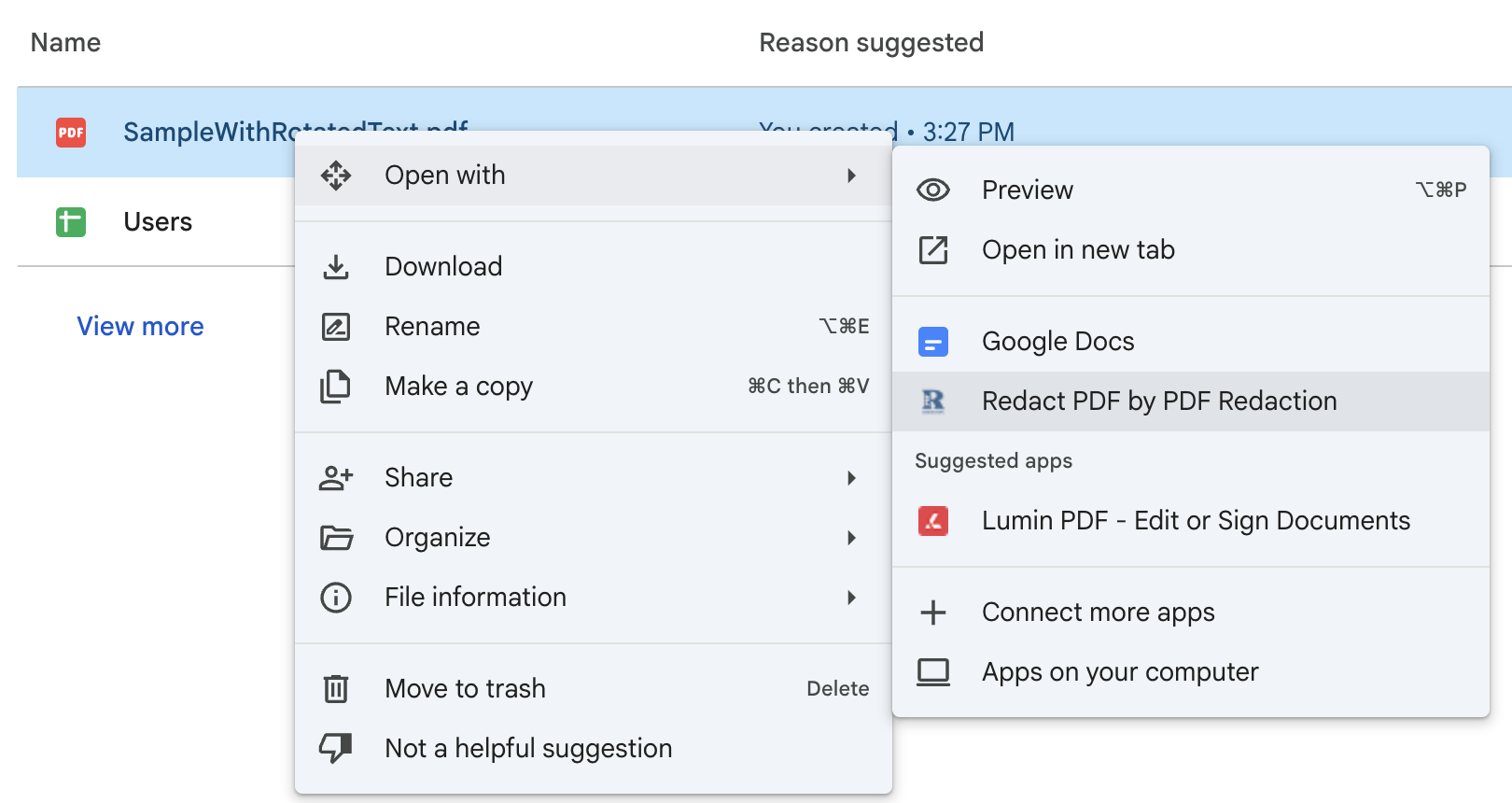
- Open with in Google Drive™: right-click a PDF in drive.google.com and choose Open with → Redact PDF by PDF Redaction. To get this menu item, install the app from the Google Workspace Marketplace. Workspace admins can install it for the whole domain.
- From the PDF Redaction site: on Redact PDF, or in the editor's upload dialog, click Or open a PDF from Google Drive™. A Google Drive™ file picker opens where you can choose a PDF. You don't need to install the Marketplace app for this.
Redact a PDF from Google Drive™
- Open the PDF with Open with in Google Drive™, or choose it in the file picker.
- Click Continue with Google and allow access to the file. Pick the same Google account you use in Google Drive™.
- The PDF opens in the redaction editor. Run AI detection, then keep, remove or resize findings, or draw your own redaction boxes. See Online editor for the editor's tools.
- Sign in to PDF Redaction and download the redacted PDF.
The redacted copy is downloaded to your computer. It is not saved back to Google Drive™ automatically, so upload it to Drive yourself if you want it there.
Account and limits
Opening and redacting a PDF is free. Downloading the redacted file needs a free PDF Redaction account (sign in with Google or Microsoft). Signed-out users can open PDFs up to 5 MB. Larger files ask you to sign in first. Monthly page limits depend on your plan.
Permissions and privacy
- Only the files you choose. The app uses Google's
drive.filepermission. It can read only the PDFs you open with it or pick in the file picker. It can't browse, read or change anything else in your Google Drive™. - No stored Google token. The access token stays in your browser's memory on the hand-off page and is not saved on our servers.
- The file is processed in your browser. The PDF downloads from Google Drive™ straight into your browser, where it is opened, OCR'd and redacted. The file itself is not uploaded to our servers.
- AI detection sends page text only. By default, the extracted page text is sent for PII detection, with zero data retention. Switch detection to Local mode to keep everything on your device.
Troubleshooting
| Message | What to do |
|---|---|
| Google access wasn't granted | You closed the Google popup or declined access. Click Try again and allow access. |
| This file can't be accessed | The Google account you chose isn't the one that has the file. Click Try again and pick the account you use in Google Drive™. |
| This file isn't a PDF | Only PDF files are supported. Convert the document to PDF first. |
| The file wasn't found | The file was deleted or moved. Open it again from Google Drive™. |
| Only existing PDFs can be opened | The app can't create new files. Right-click an existing PDF and choose Open with. |
If the Google sign-in popup doesn't appear, allow popups for pdf-redaction.com in your browser.
Google Drive™ is a trademark of Google LLC. Redact PDF by PDF Redaction is not affiliated with or endorsed by Google LLC.