
Redaction Editor
Guide to the redaction editor used by PDF Redaction Online, Studio and Studio Desktop: tools, review, bad redaction check and detection settings in one place.
PDF Redaction Online, Redaction Studio and Studio Desktop all use the same redaction editor. The tools, the review panel, the bad redaction check and the Settings dialog work the same way in each product, so they are documented once here.
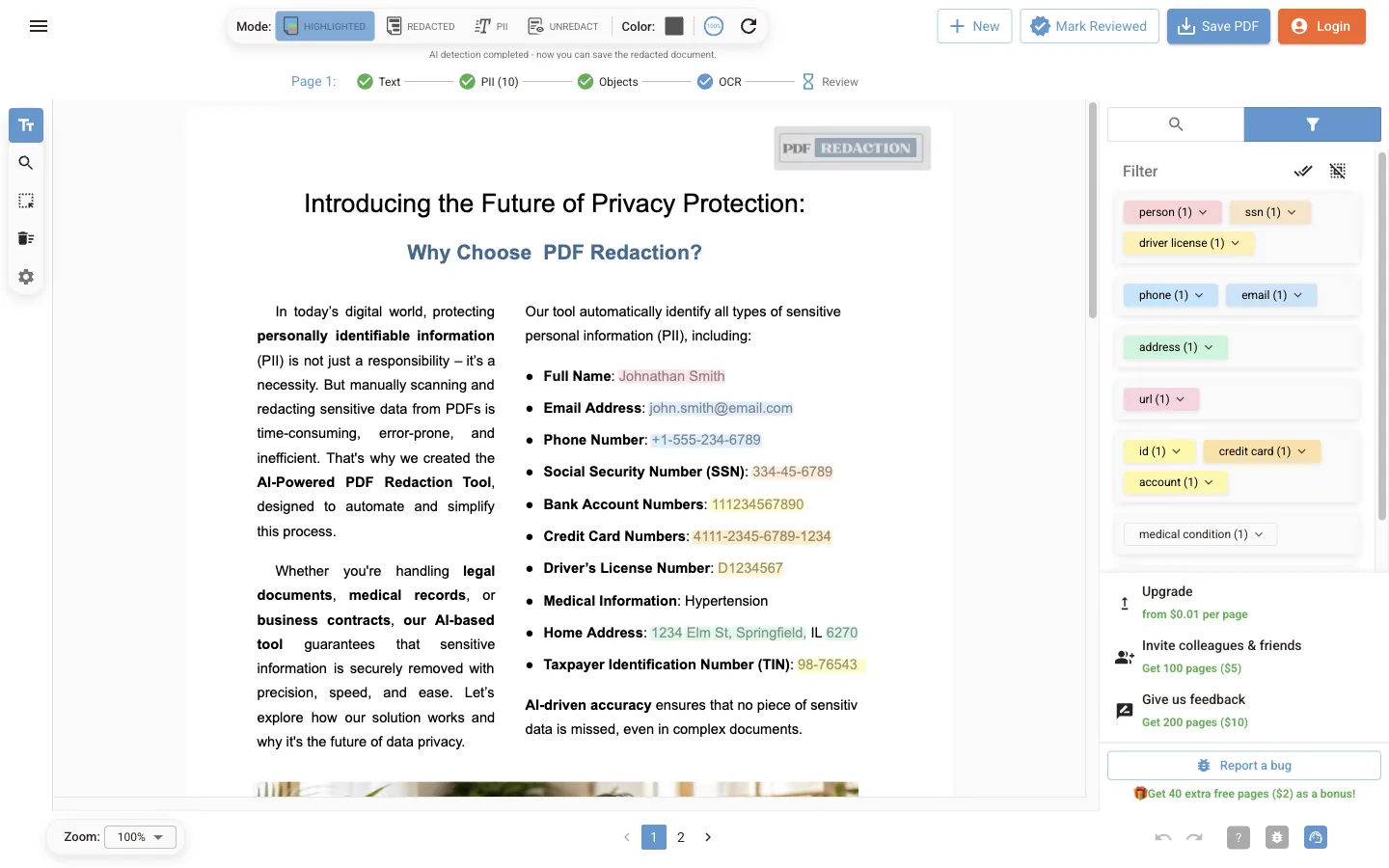
Editor interface
View modes, tools, toolbar buttons and keyboard shortcuts.
Review and edit redactions
PII filter, findings table, manual text selection and drawn boxes.
Bad redaction check
Find text left under boxes in a PDF redacted elsewhere.
Detection settings
Cloud PII, Local NER, rule-based patterns, faces and signatures.
OCR settings
Scanned pages, text inside pictures, OCR languages and CPU threads.
Differences between products
The editor is the same, but how you open and save documents depends on the product.
| Online | Studio | Studio Desktop | |
|---|---|---|---|
| Sign-in needed to open a PDF | No (only to download) | Yes | Yes, at launch |
| Pages and file size per document | 10 / 25 / 100 pages, 5 / 25 / 50 MB, see limits | No per-document limit | No per-document limit |
| Documents open at a time | One | A library of documents, processed in the background | Same as Studio |
| Your edits are kept | In this browser, for the open document | Saved automatically to the document library | Same as Studio |
| Sample document, Google Drive, Dropbox | Yes | No | No |
| Open PDFs from your file manager | No | No | Yes |
| Settings dialog and detection defaults | Same | Same | Same |
Pages processed by AI detection count against your plan in every product. One account works across all of them.
Where to start
Release Notes
What's new in each version of PDF Redaction Studio Desktop for Windows, macOS, and Linux — new features, improvements, and fixes.
Editor interface
Reference for the PDF Redaction Online editor: the Highlighted, Redacted, PII and Unredact modes, the side toolbar, top bar buttons and keyboard shortcuts.