
Usage and limits
How the online editor counts pages against your monthly allowance, when the period resets, where to see your usage, and the size and page limits per document.
There are two kinds of limit: how many pages you can process per month (set by your workspace's plan), and how big a single document can be (set by your account).
What counts as a page
- One page is counted each time AI detection finishes on a page while you are signed in.
- Pages are counted against the workspace that is active when you scan.
- Running detection again, for example with the refresh button or after changing settings, processes the pages again and counts them again.
- Opening, reviewing, editing and saving do not count. Saving the same document several times is free.
- Without an account nothing is counted, and only the first 10 pages of a document are scanned.
Monthly period
Your allowance applies per billing period of one month. The first period starts when the workspace's plan starts. At the end of each period the counter goes back to zero. Unused pages do not roll over; wallet credits do.
Changing plan does not reset the counter. Pages already used this period stay counted under the new plan.
Where to see your usage
| Place | What it shows |
|---|---|
| Editor top bar | A compact counter such as 42 / 100 pg. Hover it for details |
| Profile → Info | Pages used this period and your document limits |
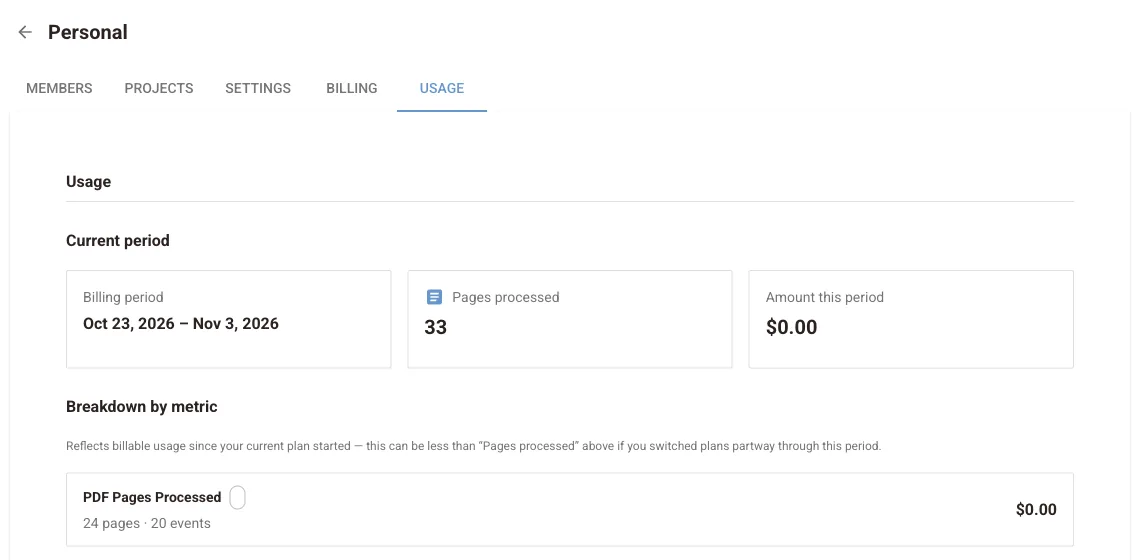
| Workspace → Usage | The current period's pages and amount, a breakdown by metric and a table of past periods |
| Workspace → Billing | Pages used this period against the plan's total, including extra credits |
When you run out, the editor shows Page limit reached for this billing period. Upgrade the plan, top up credits, earn free pages or wait for the next period.
Per-document limits
| Without an account | Free | Paid plan | |
|---|---|---|---|
| Maximum file size | 5 MB | 25 MB | 50 MB |
| Pages scanned per document | 10 | 25 | 100 |
Pages beyond the limit are not scanned and are not included in the saved file. To process a longer document, split it into parts or upgrade. Paid limits apply while you own at least one workspace on a paid plan.
Other limits
- File type: PDF only. Convert Word files and images to PDF first.
- One document at a time: opening a new file replaces the current one.
- Browser: use a current version of Chrome, Edge, Firefox or Safari on a desktop or laptop. AI models and OCR run in the browser, so a machine with more memory and CPU cores works faster.
Need more than 100 pages per document, or batch processing? Look at Redaction Studio, Studio Desktop or the API.
Next steps
Plans and billing
How to change your PDF Redaction plan, add or update a payment method, top up page credits, edit billing details, download invoices and cancel a subscription.
Privacy and data handling
What the online editor sends and stores: your PDF stays in the browser, Cloud PII sends page text only, Local NER sends nothing, and what is kept for your account.